

Verath
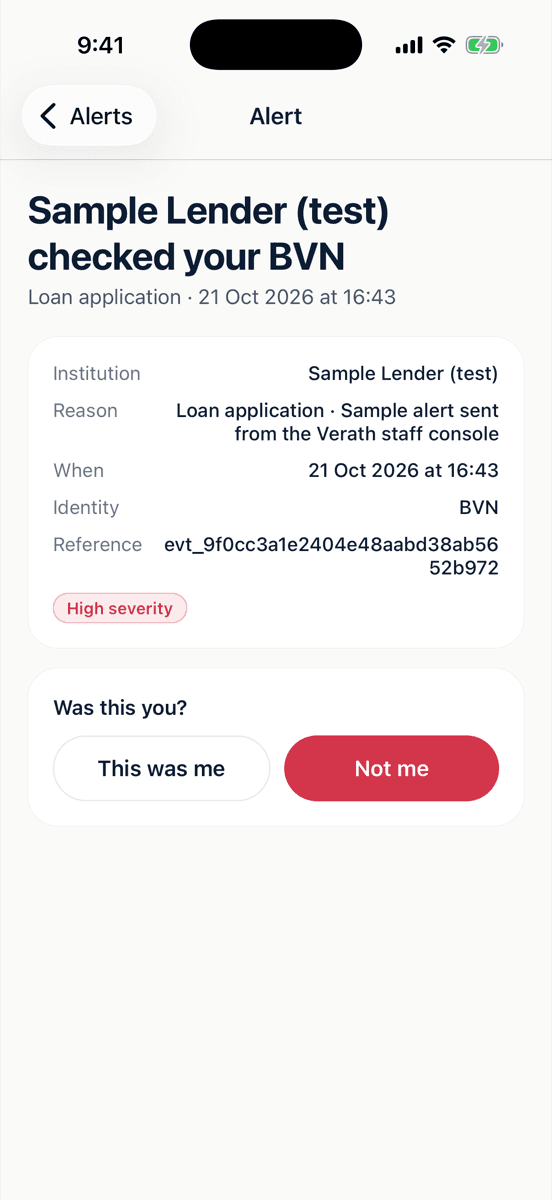
A lender just checked your BVN. Was this you?
See it in action
The whole app, at a glance.
Swipe, scroll or use the arrows. Whichever screen lands in the middle comes into focus.
Home
What needs your answer, open disputes and recent checks, at a glance.
In the app
Know when your identity is used. Say no when it isn’t you.
Alerts the moment you’re checked
When a connected bank, telco or lender checks your NIN or BVN, you get a notification with who, why and when.
“Not me” in one tap
Didn’t apply for that loan or SIM? Say so, and Verath sends the dispute straight to the institution so they can stop it.
Lock your identity
Lock your NIN or BVN so connected institutions can’t open new accounts with it until you unlock it.
Your history in one place
Every check, answer and dispute, with its status, so you can see exactly how your identity has been used.
On a computer?
Point your phone camera here.
Scanning takes you straight to Verath in the right store for your phone. No searching, no look-alike apps.
Trouble installing? Contact support.
Works on iPhone and Android: your phone opens the right store.
Before you install
Common questions
Where can I download Verath?
On the App Store for iPhone and on Google Play for Android. Search for “Verath”, use the buttons on this page, or scan the code with your phone’s camera.
Is it free?
Yes. The app is free to download, and Verath is free for individuals.
Can I sign up in the app today?
We’re opening accounts in stages. Join the waitlist on verath.io and we’ll email you when yours is ready. If you already have an account, just sign in.
Which institutions send alerts?
Banks, telcos, lenders and other businesses connected to Verath. You’re alerted when one of them checks your NIN or BVN; checks by institutions not yet connected won’t appear.
Does Verath store my NIN or BVN?
Identity numbers are designed to be held only as keyed hashes for matching, plus one encrypted copy in a dedicated key vault. Institutions send a keyed hash, not your number.
The app won’t install. What can I do?
Check that your phone’s software is up to date and you have some free space, then try again. If it still won’t install, contact support and tell us your phone model.